
Heading to an unfamiliar destination? These tools and tricks help you figure out which areas are safe before you even arrive.
General warnings about entire cities or countries are usually exaggerated and repeated by people who don’t even travel. However, truth is that some areas can be more dangerous than others. When you’re traveling somewhere new, one of the questions you ask yourself should be: which neighborhoods to stay at? You can’t always tell just by looking at a map. That’s where smart research and the right tools come in.
Why Location Safety Changes Street by Street
Here’s what makes travel safety tricky: a city isn’t just “safe” or “dangerous.” One street might be perfectly fine while the next block over is sketchy. Some areas are great during the day but risky at night. And things change over time too.
That’s why you need current, detailed information about specific locations, especially if traveling alone and want to have peace of mind.
The Best Free Tool: Ask People Who Live There
The number one way to learn about location safety? Talk to locals.
People who actually live in a place know things and can tell you:
- Which specific streets to avoid
- What time of day different areas get unsafe
- Which neighborhoods look touristy but have problems
- Where locals themselves won’t go
How to Connect with Locals
You don’t need to know anyone personally. Here’s how to get local advice:
Before your trip:
- Join Facebook groups or Reddit pages for the city you’re visiting
- Message your hotel or Airbnb host with specific questions
- Ask on travel forums about specific neighborhoods
When you arrive:
- Talk to your hotel staff, they know the area well
- Ask restaurant servers and shopkeepers
- Chat with tour guides or taxi drivers
Ask the Right Questions
Don’t just ask “Is this area safe?” Be specific:
- “Is it okay to walk from [hotel] to [attraction] at night?”
- “Which neighborhoods should I avoid after dark?”
- “Are there any streets that look fine but locals avoid?”
The more specific you are, the better answers you’ll get.
If you don’t want to ask simply check existing forums. Maybe informations are out there already.
Digital Tools That Show Location Safety
Several apps and websites collect safety information from travelers and locals. They show you maps with different areas marked by safety level.
Hoodmaps: See How Locals Describe Each Neighborhood
Hoodmaps is a visual map tool that shows how people actually describe different parts of a city. Each area has labels and color coding based on what locals and travelers say about it.
You’ll see honest descriptions like “safe but boring,” “don’t come here at night,” or “touristy area.” It’s crowdsourced, so real people add the information. The map of Lima, for example, clearly shows which areas locals call safe and which ones they warn about.
Best for: Getting a quick visual sense of where to stay and which areas to skip
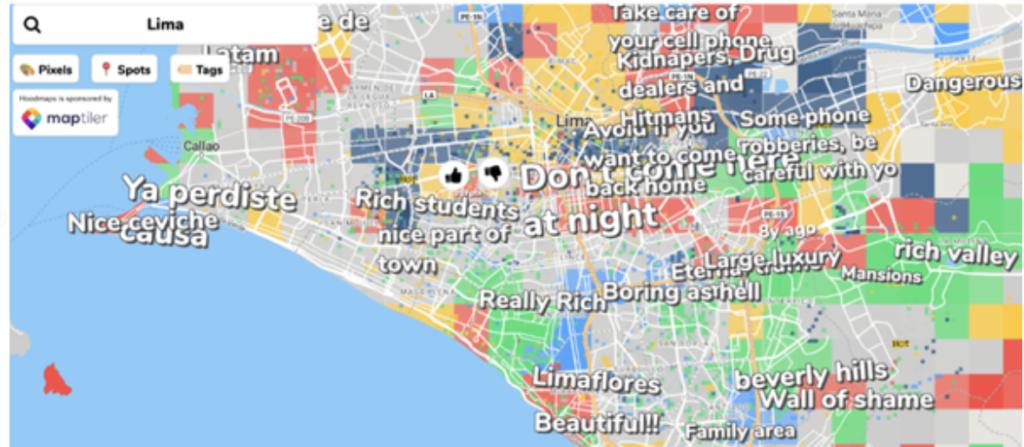
I gave a photo of Lima, as I actually stayed there and can confirm it is consistent with how I saw it on site. However I also had local advise (I met a girl at the airport) and she gave me much more info then simply these short sentences like “boring as hell”.
Geosure: Real-Time Safety Info
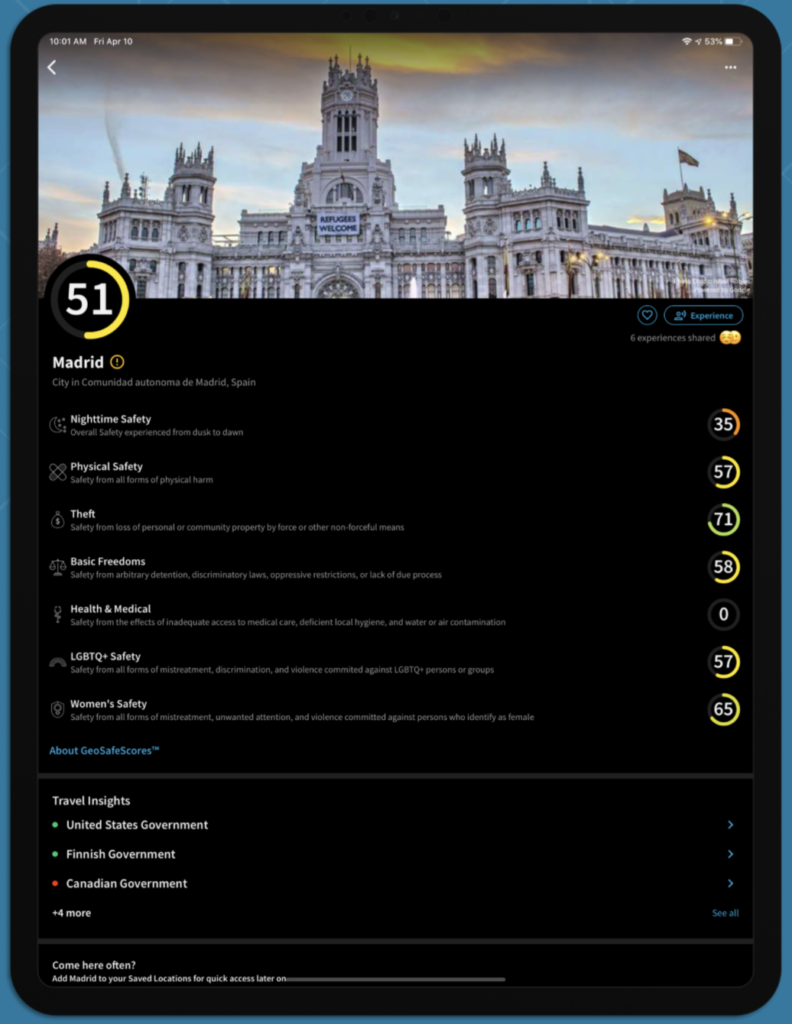
Geosure crowdsources safety details based on your exact location and the current time. It gives you up-to-date information about the area you’re in right now.
Best for: Checking safety while you’re actually out exploring
The Smart Research Strategy
Here’s how to combine these tools for the best results:
Step 1: Start with Hoodmaps Look up your destination city on Hoodmaps. This gives you a quick visual overview of which neighborhoods are safer and which to avoid.
Step 2: Ask Locals Online Post in city-specific Facebook groups or Reddit with questions about the specific areas you’re considering.
Step 3: Check with Your Accommodation Email your hotel or Airbnb host. Ask specific questions about walking safety in their neighborhood.
Step 4: Download Safety Apps before you leave so they’re ready when you need them.
Step 5: Keep Asking Questions When you arrive, talk to hotel staff, restaurant workers, and other locals. They have the most current information.
Red Flags That Mean Research More
Pay extra attention to location safety if you notice:
- Conflicting information (some sources say safe, others say avoid)
- Warnings that are very time-specific (“fine until 8pm”) – for example in Colombia I was at the beach with my friend till sunset and at some point police approached us and told us to go as it may be dangerous after no sunlight.
- Locals themselves saying they avoid certain areas
- Recent news about problems in specific neighborhoods
When you see these red flags, do more research before you chose specific location.
Trust Multiple Sources
Don’t rely on just one app or one person’s opinion. Cross-check information:
- If Hoodmaps shows an area as risky AND locals confirm it, take it seriously
- If one app says avoid but locals say it’s fine, the locals are probably right
Just so we understand each other
Staying safe in new places isn’t about avoiding entire cities or countries. It’s about knowing which specific locations are fine and which aren’t.
Use tools I gave you to see the big picture.
Smart location research means you can travel confidently instead of worrying the whole time.